Being in business is a serious commitment of time and effort each and every day. There is a lot of routine email communication, data entry and endless emails that can burn your team out. Smart owners are turning the game today. Once you understand how AI can help you automate business tasks, you can save hours, eliminate human error, and save money on payroll in no time. It frees up your team’s time to concentrate on authentic business development.
Business Task Automation explained.
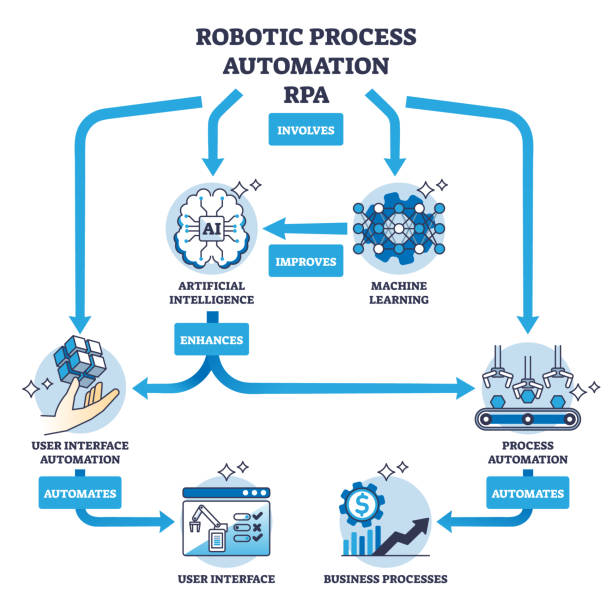
Business task automation is the use of smart software tools to automate repetitive tasks. Before now, someone had to be at a desk, click each and every button and to copy lines of data by hand. Artificial intelligence is capable of reading documents, organising spreadsheets, composing messages and even making simple decisions today.
Consider the typical day you do work. How much time do you spend sorting through your Inbox? How many of the same questions do you answer or take numbers for from paper receipts?
These chores have to be done – but they take time. They sap your energy and distract you from learning how to plan, sell and build your brand. AI operates behind the scenes and is your digital sidekick. It won’t get tired, it won’t take a sick day, and it will accomplish tasks in seconds.
Here are some of the significant ways AI can streamline everyday tasks:
Don’t need to be a large tech company to utilize smart tools. Individuals, small retail stores, local service providers and single creators are already utilizing automation on a daily basis to accomplish more.
Smarter Customer Support

Nobody wants to be on the phone waiting or on hold for days to get an e-mail response. AI chatbots can engage in natural conversations with your visitor with your website. They respond to basic queries regarding shipping, store hours, return policies and pricing immediately.
If a client uses a tool to raise a complicated topic, the tool will allow the topic to proceed to a human worker. This also puts your purchasers at ease and enables them to receive immediate responses at any hour of the day or night. Your support team is only there when there are critical issues, therefore, reducing stress and worker burnout.
The speed of data entry and bookkeeping are also enhanced.
Manual data entry can be time consuming and costly. Employee could input a wrong dollar amount or lose a paper invoice.
Receipts, PDFs, and invoices are scanned in seconds with the help of AI tools. The software reads the text, extracts the names of the vendors and quantities and enters the numbers directly in your accounting books. It can also automatically create invoices and monitor outstanding balances, and send friendly reminders to clients to make payments.
Create your social media presence and marketing strategy.
Marketing campaigns have to be planned on a regular basis. AI can generate blog post ideas, write social media posts, email subject lines, and more.
You can create workflows that create content, recommend when to post it and monitor the number of clicks on links. You still have control of the voice and over the final work, but you will never see a blank screen again.
Distribute calendar schedules and sort emails.Send calendar schedules, sort emails.
Dirty Inboxes are time wasters. AI email filters can categorize incoming emails according to the urgency. They classify spam and reply rapidly to typical questions, and mark hot sales leads so you can be responsive.
It’s also so much easier to schedule meetings. In this case, the smart assistant tools would scan your calendar and tell you when you aren’t busy, or if you are, they would offer you an open time to meet, and then send a confirmation message without any back and forth.
Manual Tasks vs AI Automation (Chatbots)
Let’s compare how everyday work and smart automated workflows are similar and different:
| Business Task | Manual Process | AI Automation Method | Key Benefit |
|---|---|---|---|
| Customer Support | Staff types replies one by one | Chatbots answer simple FAQs 24/7 | Zero wait times for buyers |
| Data Entry | Typing receipts into spreadsheets | Tools scan and log expenses instantly | Clean books and fewer errors |
| Content Creation | Writing every draft from scratch | AI builds drafts and outlines in seconds | Saves hours of creative time |
| Lead Tracking | Remembering to email prospects | Automated workflows trigger messages | Higher sales conversion rates |
| Meeting Booking | Sending emails back and forth | Smart links book open calendar slots | Faster scheduling with no friction |
Large savings for Your Wallet!
What are the advantages of automation to your company? The advantages are much greater than saving a few minutes occasionally.
- More Free Time: As your employees can now share three hours of busywork each day, they have more time to close sales, assist clients, design better products, and more.
- Reducing Operating Expenses: It is possible to grow business without adding new administrative staffs for each step. You are able to get a lot more out of your current team.
- Less Human Error: It is easy for humans to make simple errors when they are tired at the end of a long shift. Smart software performs the exact same actions each and every time without any errors.
- Better Scalability: The automated workflows operate on ten tasks or ten thousand tasks, without any hindrances to any business.
How to get started in automating tasks.
Starting doesn’t have to mean it means you are starting from scratch. Proceed incrementally and evaluate your progress, and gradually expand your systems.
Identify Your Bottlenecks
List all the chores that you and staff do over 3 times per week. Point out activities that are tedious, repetitive, or need a long time. These are the types of tasks you should consider automating.
Pick Simple Tools
Check for programs that are suitable for beginners and work with the programs you are already familiar with, such as your email software, chat software or spreadsheet software. There are a number of modern tools that don’t need any coding and have drag and drop menus.
Test and Train
Use the automated tool in conjunction with your normal procedure and run it for a week or two. See the results, adjust anything that doesn’t feel right in the settings and demonstrate correct use of the tool to your team. When all of the users are comfortable, allow the software to run independently.
Final Thoughts
The smartest approach to running a modern, lean business is knowing how AI can help automate business tasks. You don’t need to be an IT expert, or have a lot of money to use these tools. Focus on one repetitive, slow task in the beginning today. The more software can handle the mundane tasks, the more time you will have for your business to grow, more revenue you will make and more time you will save.
Frequently Asked Questions
So, is AI automation costlier for small businesses?
No. You can sign up for many popular tools with starter plans for free, or with relatively low monthly subscriptions which easily fit small business budgets.
“Will AI automation take the place of my employees?”
No. AI eliminates tedious tasks and lets your staff concentrate on creative tasks, strategy, and customer relations.
Does coding need to be used to automate tasks?
Not at all. Most current automation platforms feature an easy to use visual builder and drag-and-drop settings which any individual can established.
Which is the easiest task to automate is the first?
The simplest places to start are scheduling appointments, basic sorting of e-mail and common customer questions.
Are companies’ data safe with the use of AI tools?
Yes, provided that you select reputable and popular software providers that adhere to tight privacy practices and make sure a robust data encryption system is in place.